
System state through ambient signals
Concept for intuitive awareness of microscope system state
🔬
How might we communicate the current microscope system state intuitively - by only using ambient LED and sound feedback?
Introduction
A completely new Microscope hardware will be equipped with new light units (2 LED strips at the handles) and small speakers - which should both help to directly understand the current state of the system from a distance.
Context
Company
Year
2023/24
Job Title / Role
Senior UX Designer
Domain
Microscopy
Tags
Light Microscopy, User Research, Hybrid Sketches, No Display
Design task
The aim is to create a light and sound concept. How to quickly and intuitively indicate relevant status changes of the microscope from a distance? This should reduce the need to check the attached display.
Note: In this case study I can only use abstract images, because the microscope hardware has not been released yet. These images show enough visuals to understand the status indication concept.
Design process
Step 1: Which are the relevant system states a user needs to see?
Documentation of the most important states that users need to be aware of when they are not working directly at the microscope. The initial list of desired states was long; reducing the number of options was necessary to ensure that users could understand and remember the meaning of a light change intuitively.
Outcome:
List of required states: On, Initializing/Shutting down, Ready to use, Processing, Paused (Processing), Processing finished, Warning, Error

Step 2: Collect & analyse established Zeiss status light patterns
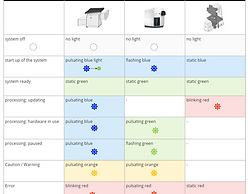
Comparison of status light patterns of different Zeiss devices (Microscopes, attached electronic devices). Unfortunately they did not follow a common light pattern (color, animation).
Outcome:
Comparison table that shows the patterns of status lights from various Zeiss products, as well as a column with unified light pattern for our new microscope.
Step 3: Review official norms for status light indicators
As it is often extremly relevant to recognise and understand the status of technical systems intuitively, there are guidelines for indicator lights. These guidelines cover ergonomics, visibility and colour. The new light concept should follow these guidelines.
Outcome: Adjusted status lights pattern list for the new microscope (color and behaviour) which is now aligned with the norms.

Step 4: Define concept
Based on the previous steps — the defined hardware states and the unified light pattern definition, which complies with the norms — I was able to create an initial light pattern concept.
Outcome: Detailed description of each pattern: light color and behavior for each state change. Including sound, if applicable for that state.

Step 5: Create a digital prototype
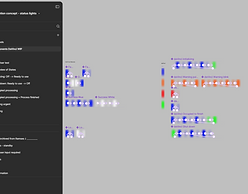
I created a digital prototype using a hybrid sketch approach to simulate the look and feel of the animated light states on a realistic image of the future microscope hardware. In Figma, I used an image of the latest 3D rendering of our new microscope and applied a symbol containing the different light patterns of the defined states.
Outcome: 🎬 Animated visualisations for all states have been exported. These animations realistically simulate the colour and behaviour of the microscope's LED lights when the system state changes.
Step 6: Usertesting 🔬
We conducted a user test with seven power users to find out if the proposed status light patterns are intuitive.
We presented the videos and sounds to the users one after another, providing no further information. This simulated a realistic situation in which a user enters a dark laboratory and looks at a microscope from a distance. We then asked the users to explain what they could infer from seeing the microscope like this.
Outcomes:
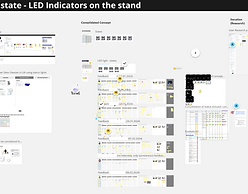
(1) List with feedback for each state. Which states were clear to everyone and which need to be reworked?
(2) Additional requirements for further work on the general status concept.
Step 7: Concept refinement
I reworked the concept and adjusted some of the light patterns based on feedback. Some animations were too similar and needed to be more distinct. The different error and warning states were also difficult to interpret correctly using light and sound alone, so I merged and simplified those states. Further details and distinctions can be displayed later on the screen of the connected PC.
Outcome: Adjusted list of states with refinded light patterns and description of the states. The adjusted patterns were updated in the digital figma-prototype too and discussed with the users again.

Step 8: Final documentation and handover
The final Confluence documentation included the status light concept itself, the results of all user research activities and the next steps. The next steps contained a list of further requirements for the upcoming project phase in a few months, when the status concept would need to be aligned with and integrated into the software and app of the attached display.
The concept was presented at a hand-over meeting attended by engineers, project managers and a UX designer working on a similar task.
Working at Carl Zeiss

as a Senior UX Designer (2023/2024) and Working student (2018/2019)
Carl Zeiss Microscopy is a leading global provider of high-end microscopy solutions , enabling groundbreaking discoveries in life sciences, materials research, and industrial applications.
Alongside world-class optical technologies, software development plays a central role. Through driving image acquisition, image analysis and data management raw microscopy data can be translated into actionable insights. This integration of hardware and software ensures users can achieve precise, reproducible results and accelerate scientific progress.
I worked as a Senior UX Designer from 2023 to 2024 in the department of light microscopy. Light microscopes are used in many different fields (medicine, biology, materials science, pathology, etc.) mostly by users from academia.
As a Senior UX Designer I was involved in the concept and design of software and hardware interfaces of complex high-end light microscopes.
I was responsible for:
-
HMI concepts for new microscope hardware (buttons, controls, status visualization)
-
Interaction concept for interface of a new mobile hardware control panel
-
Concept for integrating new features into existing PC software
